Create Custom Documents (Project Version or higher)
You can use Microsoft Word templates to configure your own custom documents. These documents can use your standard formatting and headers and footers. You can also embed project information into your existing standard reports or documents using standard Bookmarks. The bookmarks specify the type of information to be placed at a specific location.
There are four steps to this process:
- Create the template
- Add Bookmarks to the template
- Set the relevant documents to use the template
- Create the reports
To create the template
- In Microsoft Word, create a new template (.dot or .doc file) or open an existing template.
- Create headers, footers, titles, graphics, tables of contents and any other content you require in the template.
To add Bookmarks to the template
- From the Insert menu, choose Bookmark
- PROD_PBS inserts the PBS
- PROD_LIST inserts the Product Checklist
- Click Ok.
- Add Bookmarks for all the data you want to add to the document.
- Save the Word template to My Documents\My ProductBasedPlans\Templates
The Bookmark dialog opens.

In the Bookmark Name field, type the code for the information you want to insert and then click Add. Different codes cause different project data to be inserted in the document. For example:
See the ChangeAide Bookmark Overview for details of the full set of bookmarks.
To set a document to use the template
- From the Reports menu choose Select Report. The Reports View opens.
- Select the row for the report that you want to customise.
- If the Details form is not displayed, right click anywhere in the list of documents and choose Show Details.
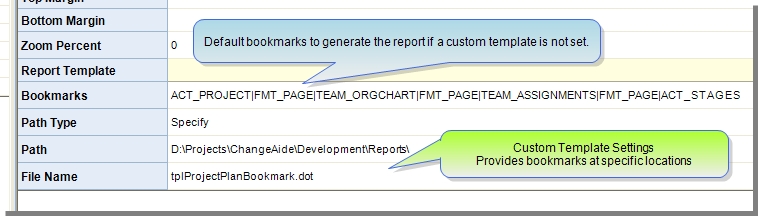
- You set up the template using the Path and File Name fields in the Report Template section of the Details form.
- Double click the Path field. The Specify a location for the document dialog opens.
- Browse to the template you created and select it.
- Click Open. The Path and File Name fields are filled in with the name and location of your template.
To create the document
Note: All of these settings are saved for you to create future documents if you save the PBP file.
 Click here to provide feedback on this topic
Revision: 3.3.7
Customer Driven Solutions Limited©2007, 2008, 2009, 2010, 2011, 2012
Email: